Epic/Feature Timeline View
Overview
This view provides a structured way to plan and track work across Iterations, Epics, and Features. By combining timeline visibility with progress metrics and team context, it helps teams understand what’s planned, what’s in progress, and how work is progressing at both a high and detailed level.
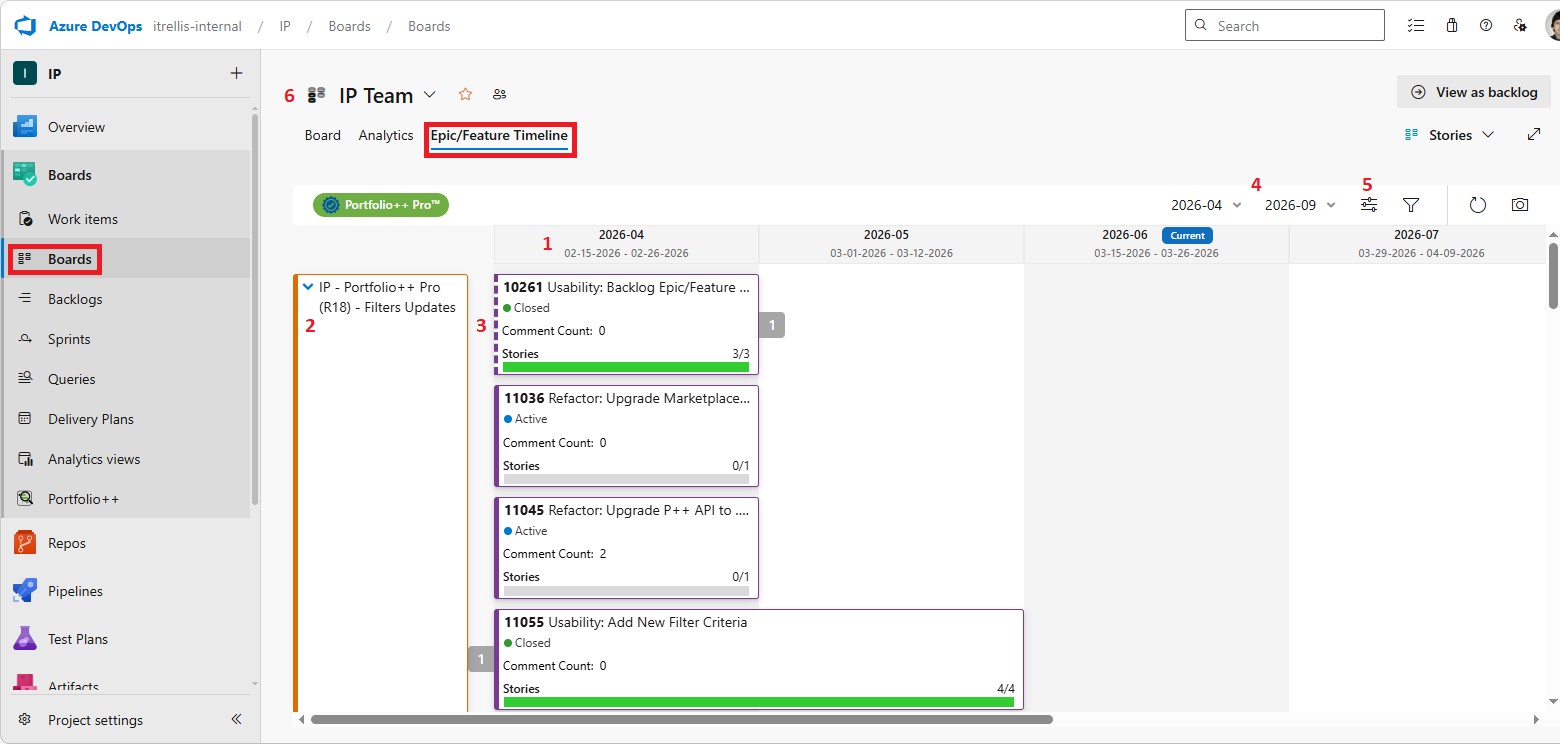
1) Iterations
Displays the Iteration name, start date, and end date.
- Current Sprint: The current sprint is highlighted with a blue tag.
2) Epics
Listed on the left side based on the currently selected Team.
- Click the displayed name: Navigate directly the to Epic in Azure DevOps.
- Arrow: Expand or collapse the Epic and all its Features.
3) Features
Shows all Features under each Epic for the selected Iterations.
- Fields: The following fields can be displayed via Options:
- ID
- State
- Tags
- Assigned To
- Metrics: Show as either a count or a percentage.
- Green Progress Bars: Show current progress based on configurable options in Options.
- Metrics:
- User Story / PBI Count
- Story Points / Effort
- Task Count
- Action: Clicking a green progress bar opens a screen showing all related Work Items. (Pro Feature)
- Metrics:
- Dotted line: Indicates the Work Item extends beyond the selected date range.
4) Selected Iterations
Choose the start and end Iterations to display in the view.
- Default: If a current Iteration is available, the view initially displays 2 Iterations before and 3 Iterations after the current Iteration. If there is no current Iteration, the view displays the most recent 6 Iterations.
- Saved Preference: When a current Iteration is available, your selected range relative to the current Iteration is automatically saved as a preference. The same Iteration range is restored the next time the page loads.
5) Options
See Roadmap Options for more information.
note
Some of the Roadmap Options are not available for this view.
6) Current Team
Changing the selected Team updates the Epics and Features displayed.