Offline Subscription for Azure DevOps Server (TFS)
Organizations using Azure DevOps Server (formerly known as Team Foundation Server, TFS) are only eligible to upgrade to Portfolio++ through an offline organization license.
Overview
The process requires retrieving your Organization Name and Organization ID, submitting a request for an offline subscription key, and completing payment.
Once your invoice is paid, we’ll email you the Offline Subscription Key for use in Portfolio++.
Request a Portfolio++ Offline License
-
In Azure DevOps, click the blue Azure DevOps link in the top-left corner.
-
click Organization Settings in the bottom left
-
Under Extensions select Portfolio++ Admin.
-
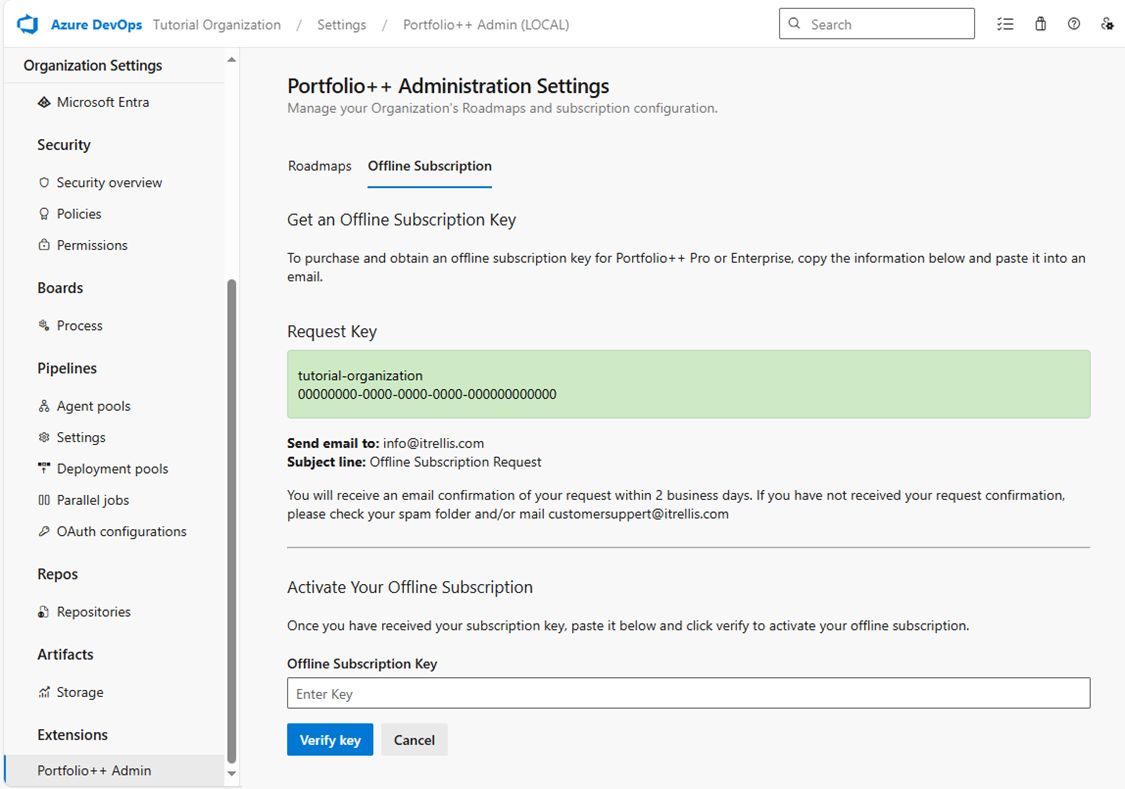
Open the Offline Subscription tab.
-
Click Request Offline Subscription Key.
-
A green box will display your Organization Name and Organization ID.
Copy this information and include it in an email:- To: info@itrellis.com
- Subject: Offline Subscription Request
Mention any multi-year or multi-organization licensing needs in your email so the invoice can be adjusted.
- You will receive a confirmation email within 2 business days.
If not, please check your spam folder or contact us at info@iTrellis.com. - The confirmation email will include an invoice. After payment, reply to confirm and we’ll email your Offline Subscription Key.
- Paste the Subscription Key into the same Offline Subscription tab.
- Click Verify Key to activate your license.
Example
Below is an example of the Offline Subscription page / key request screen.