Board
Overview
Build Options control how Work Items are sourced and how timelines are generated on the Roadmap. These settings determine the scope of data included and how dates are interpreted, helping ensure your roadmap accurately reflects your planning approach.
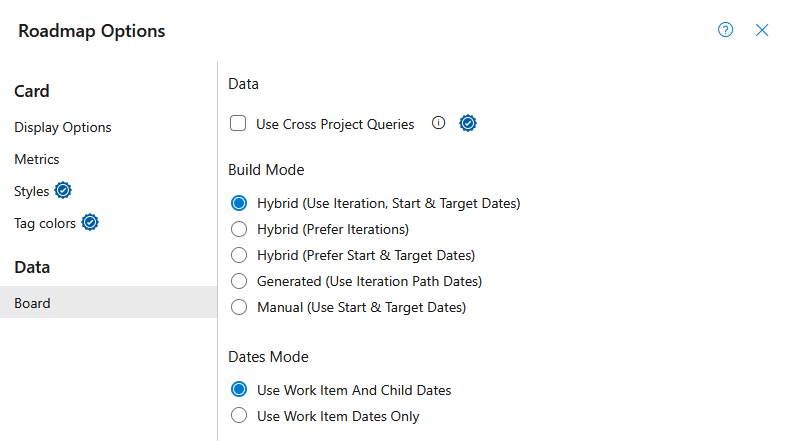
Use Cross Project Queries (Pro Feature)
Enable Cross Project Queries to include Work Items across multiple Projects based on your access.
- Work item scope: Only work items in Projects where you have access are counted.
- Children visibility: Children of selected Work Items from other Projects will also appear on the view.
- Build By Query: Automatically detects cross-project queries and fetches Work Items from accessible Projects.
Enable Cross Project Queries is not supported in Azure DevOps Server 2019.
Build Mode
Build Mode determines how timeline dates are calculated for Work Items.
For a Work Item to appear on the Roadmap, it must have dates for the selected Build Mode.
- Generated mode requires Iteration dates.
- Manual mode requires StartDate and TargetDate values.
- Hybrid modes require either Iterations or StartDate and TargetDate.
Hybrid (default)
Builds Timelines using a combination of Iteration Path dates and StartDate/TargetDate fields.
When both Iteration dates and StartDate/TargetDate values are present, the earliest start date and latest end date from either source are used.
Best for: When you need high-level planning at the Epic level while still reflecting real execution through Iterations on child Work Items.
Example: Product leadership sets quarterly target dates on Epics, while delivery teams plan User Stories into sprints.
Hybrid (Prefer Iterations)
Builds Timelines using a combination of Iteration Path dates and StartDate/TargetDate fields.
If Iteration dates are available, they will be used. Otherwise, StartDate and TargetDate values will be used.
Best for: When Iterations are the primary source of truth, but you want StartDate/TargetDate values to act as a fallback.
Example: Teams primarily manage delivery through sprint planning but occasionally use StartDate/TargetDate values for work not yet assigned to an Iteration.
Hybrid (Prefer Start & Target Date)
Builds Timelines using a combination of Iteration Path dates and StartDate/TargetDate fields.
If StartDate and TargetDate values are available, they will be used. Otherwise, Iteration dates will be used.
Best for: When roadmap planning dates should take priority over Iteration schedules.
Example: Product managers maintain roadmap dates on Epics while delivery teams continue to plan work within Iterations.
To create a roadmap experience similar to Azure DevOps Delivery Plans, use Hybrid (Prefer Start & Target Date) together with Use Work Item Dates Only.
Generated
Builds Timelines using the Iteration's defined start and end dates.
Best for: When you want to reflect what is actually planned and tracked in Azure DevOps.
Example: Sprint planning is finalized and you want the roadmap to mirror the exact iteration schedule and completed work.
Manual
Builds Timelines using the StartDate and TargetDate fields directly from the Work Item.
Best for: When timelines are not fully defined and you need to quickly estimate or plan at a high level.
Example: Early roadmap planning where dates are approximate and not yet broken down into iterations.
Dates Mode
Dates Mode determines whether timeline calculations use dates from child Work Items in addition to the selected Work Item.
Use Work Item And Child Dates (Default)
Timeline dates are calculated using dates from the selected Work Item and all child Work Items.
This option provides a rolled-up view of work and is recommended for most roadmap scenarios.
Example: An Epic without dates can still appear on the roadmap based on the dates of its Features, User Stories, and Tasks.
Use Work Item Dates Only
Timeline dates are calculated using only the selected Work Item's dates.
Child Work Item dates are ignored when determining the timeline.
Example: An Epic only appears on the roadmap if it has its own valid dates based on the selected Build Mode, regardless of any dates defined on child Work Items.